腾讯云 / OpenClaw 自定义模型配置
用可直接校验的 JSON5 示例说明 OpenAI 与 Anthropic 兼容接口的填写方式。
先准备三项内容:贵数 API Key、https://api.llm-token.cn/v1、以及从本站模型列表复制的完整模型 ID。不要复制截图中的旧地址或旧模型名。
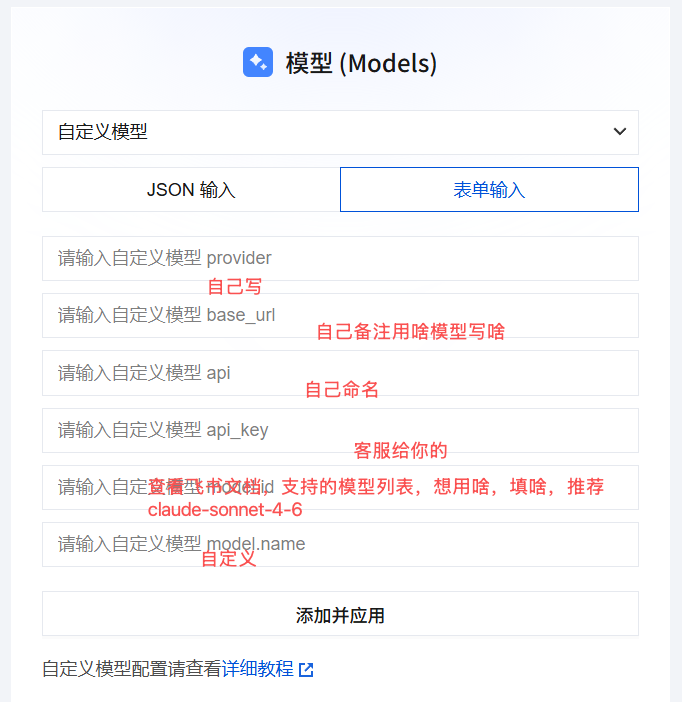 OpenClaw 自定义模型配置界面;字段位置仅作参考,请使用本文给出的 HTTPS 地址和当前模型 ID
OpenAI Compatible 配置
适合 GPT、DeepSeek、Qwen、GLM、Kimi、MiniMax 等兼容 Chat Completions 的模型:
{
  models: {
    mode: "merge",
    providers: {
      guishu: {
        baseUrl: "https://api.llm-token.cn/v1",
        apiKey: "YOUR_API_KEY",
        api: "openai-completions",
        models: [
          {
            id: "deepseek-v4-flash",
            name: "deepseek-v4-flash",
            input: ["text"]
          }
        ]
      }
    }
  }
}
Anthropic Messages 配置
客户端明确要求 Anthropic Messages 协议时,只需更换 api 和模型 ID:
{
  models: {
    mode: "merge",
    providers: {
      guishu: {
        baseUrl: "https://api.llm-token.cn/v1",
        apiKey: "YOUR_API_KEY",
        api: "anthropic-messages",
        models: [
          {
            id: "claude-sonnet-4-6",
            name: "claude-sonnet-4-6",
            input: ["text", "image"]
          }
        ]
      }
    }
  }
}
保存前检查
- OpenClaw 字段名是
baseUrl、apiKey,不是base_url、api_key。 api填适配器名称:openai-completions或anthropic-messages,不是/messages路径。- Base URL 统一填写
https://api.llm-token.cn/v1,不要再拼接/chat/completions。 - 模型 ID 会更新,请从模型列表复制,不要照抄旧截图。
- 保存后运行
openclaw models list,再用openclaw models set guishu/模型ID切换。
不要把真实 API Key 发到群聊、工单截图或公开仓库。示例中的 YOUR_API_KEY 必须替换为你自己的 Key。